Mobile Help

Loading The Site On Your Smartphone

For Your iOS Devices:

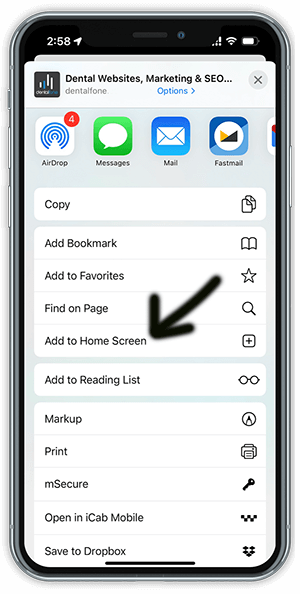
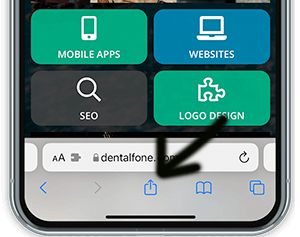
To add an icon to the home screen on your iPhone, iPod Touch or iPad when you’re looking at the home page of the app in Safari select the button shown below and scroll to and select “Add to Home Screen.”  You must be using the Safari browser to view the app in order to see this option.
screenshot-phone-image
 
screenshot-phone-home

For Your Android Devices:

On Android it’s slightly more involved, depending on the browser being used:

  • For recent Samsung devices using the built in browser, simply click the menu button (bottom left on the Galaxy S4) and select “Add Shortcut” to put the icon on your home screen. The icon should be available on your home screen for easy access.  Please note, this may not work on all versions of Android.
  • If you have loaded the most recent version of Google Chrome (please update if you have not already), simply select the menu key while on the home page of the app and select “Add to Home Screen.”
  • For other Browsers, start by bookmarking the page you want to add to the home screen.
  • For Chrome you select the menu key and then press the small “star” in the upper right hand corner, and save the bookmark in the folder of your choice.
  • Select the menu again and choose bookmarks. Locate the bookmark to save to the home screen and press and hold it until the pop up menu displays.
  • Select “Add to Home Screen” to add the icon to your phone’s home screen for easy access.
  • The process may vary slightly from device to device or browser to browser, but should work similarly to the above in most cases.
  • Older Android devices may show a generic star icon for the app instead of the customized button.

For Your Windows 8 and later Mobile Devices:

  • Open the application in your browser using a QR code scanner.
  • In the bottom right corner click on the 3 dots and select “pin to start” to add to your home screen.

QR Scanners

Most new smartphones can scan QR Codes using the built in Camera App. Just go to take a picture but don’t click the camera button, a pop-up should display when viewing the QR code through your phone that will allow you to click the link provided by the code. If your phone doesn’t support QR codes in the camera app, you can download a QR Code Scanner app from the appropriate app store for your phone.
 

Frequently Asked Questions

Looking for a practice in the

NY
areas
? Call to schedule your appointment today!

Why Choose Lesley Rosenthal, DDS

Our practice combines decades of dental expertise with a genuine commitment to your comfort and well-being. Dr. Lesley Rosenthal and Dr. Allen Kozin offer comprehensive general, cosmetic, and restorative dentistry using advanced technology including CAD/CAM same-day restorations, cone beam imaging, and soft tissue lasers. With two convenient locations in New York and Roslyn, we provide personalized one-on-one care tailored to each patient's unique needs.

Contact our office today to request your appointment!

Lesley Rosenthal DDS Practice Logo
Lesley Rosenthal, DDS

New York

ADDRESS

425 Madison Ave, 4th Floor
New York, 
NY 
10017

PHONE

E-mail Us
Opt-in to electronic communication
By submitting this form, you agree to receive email, text, and phone communications from our office. SMS Messages from the office will include: appointment reminders and follow-ups regarding due dates and scheduled appointments. Messaging frequency may vary. Our Privacy Policy and Terms & Conditions can be viewed by clicking here. Users will have the option to opt out of receiving texts by replying STOP. For assistance you may reply HELP. Standard data rates may apply.

Please note that e-mail is not a secure form of communication. Medical information placed here may not be confidential. This form should not be used by children under the age of 18. If you prefer to speak to us directly, you are also welcome to call us so that we may assist you.
Sending

Lesley Rosenthal DDS Practice Logo
Lesley Rosenthal, DDS

Lesley Rosenthal, DDS

Long Island

ADDRESS

394 Willis Ave
Roslyn, 
NY 
11577

PHONE

E-mail Us
Opt-in to electronic communication
By submitting this form, you agree to receive email, text, and phone communications from our office. SMS Messages from the office will include: appointment reminders and follow-ups regarding due dates and scheduled appointments. Messaging frequency may vary. Our Privacy Policy and Terms & Conditions can be viewed by clicking here. Users will have the option to opt out of receiving texts by replying STOP. For assistance you may reply HELP. Standard data rates may apply.

Please note that e-mail is not a secure form of communication. Medical information placed here may not be confidential. This form should not be used by children under the age of 18. If you prefer to speak to us directly, you are also welcome to call us so that we may assist you.
Sending

locations
Lesley Rosenthal, DDS
New York
425 Madison Ave, 4th Floor
New York,
NY
10017
212-752-1919
Long Island
394 Willis Ave
Roslyn,
NY
11577
212-826-8662
HOURS
Monday
8:30am - 5pm
Tuesday
8:30am - 5pm
Wednesday
8:30am - 5pm
Thursday
8:30am - 5pm
Friday
Closed
Saturday
Closed
Sunday
Closed
SOCIAL
New York
Long Island
Accessibility
 
DESIGN AND CONTENT ©
2013-
2026
BY
DENTALFONE